

Overview
Once people move beyond basic prompting, they eventually run into a question that looks more technical than it really is: which model should be used? The names can make it sound like a hardware chart or a product matrix, but the practical issue is simpler. Different models change the pace, depth, and feel of the conversation.
This matters because many frustrations that get blamed on ChatGPT in general are really mismatches between the task and the mode being used. A fast model may be excellent for everyday drafting and still feel thin on harder reasoning. A deeper model may be much better for difficult work and still feel unnecessarily heavy for simple requests. Model choice is one of the places where the experience starts to become more deliberate.
What a ChatGPT model is
At a practical level, the model is the intelligence layer doing the underlying response work. It is the part that interprets the request, generates language, reasons through structure, and decides how to continue the conversation. But the model is not the whole product. ChatGPT also includes the interface, tools, file handling, memory behavior, projects, and settings that shape how the model is actually used.
That distinction is important because people often treat the model name as if it explains everything. It does not. Changing models changes capability and behavior, but it does not replace good instructions, clear source material, or a usable workflow. The model is a major layer, not the whole system.
Why there are different types
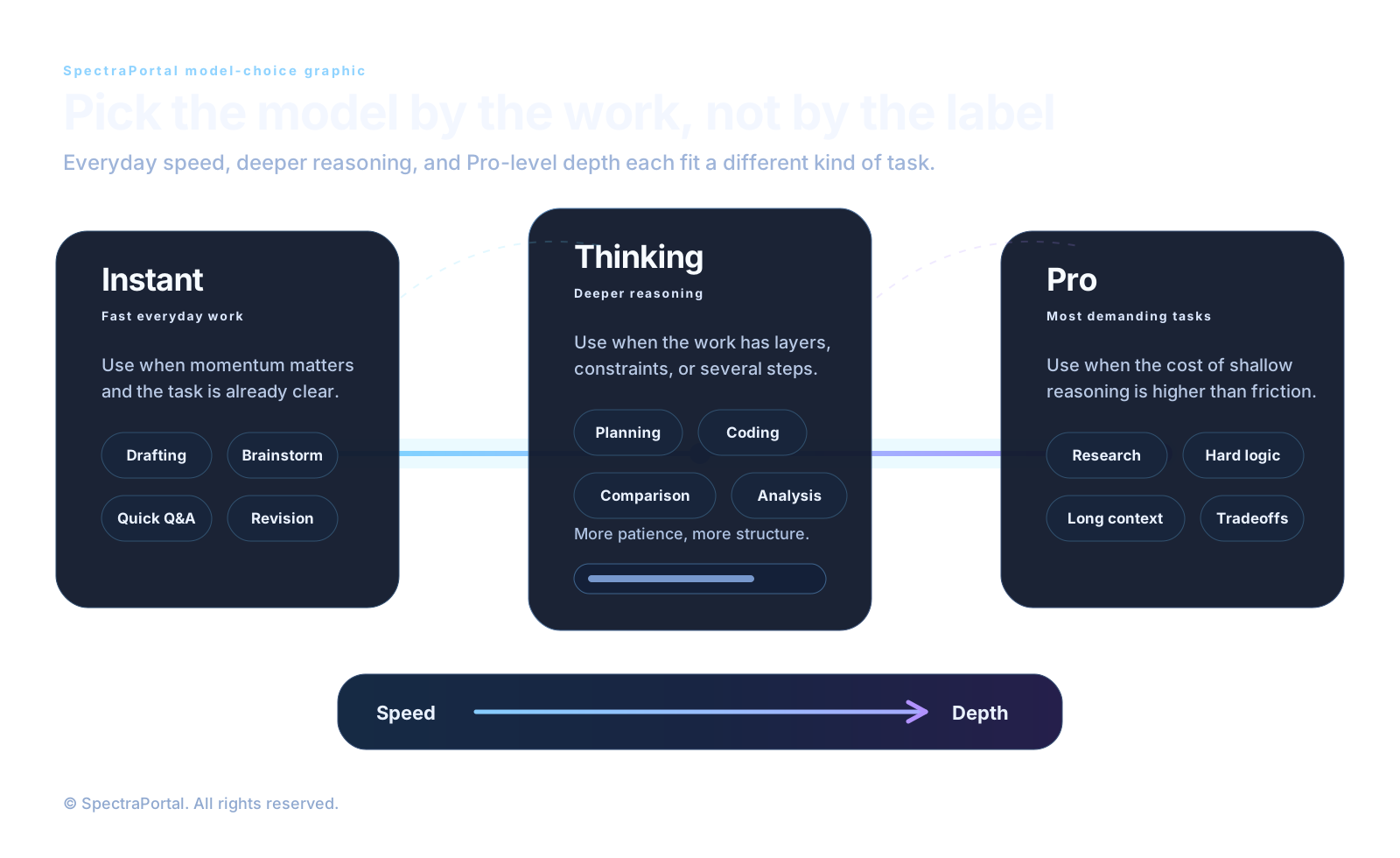
There is no single model setting that is best for every kind of task. Some work benefits from speed, conversational rhythm, and quick turnaround. Other work benefits from more deliberate reasoning, stronger planning, and better handling of multi-step problems. This is why ChatGPT tends to separate faster Instant-style everyday modes from deeper Thinking-style reasoning modes, with Pro-style modes reserved for the most demanding work when they are available.
The names of those modes can change over time, and plan access can change too. What stays more stable is the pattern. One mode is usually tuned to keep the conversation moving. Another is usually tuned to think longer and handle more difficult tasks. A higher-end option may exist for the hardest work, but it may also come with tighter access, more limits, or fewer interface features. It helps to learn the pattern instead of memorizing every label as if it will stay fixed forever.
What each type tends to do well
The faster everyday models are usually strongest when momentum matters most. They are good for ordinary questions, drafting, brainstorming, quick explanations, back-and-forth revision, and the kind of conversational flow where waiting too long would break the rhythm. They help keep work moving, especially when the task is clear and the stakes are not extremely high.
The deeper reasoning models are usually stronger when the work becomes layered. Harder writing, careful planning, multi-step coding, spreadsheet logic, document interpretation, and more difficult comparison work tend to benefit from a model that can think longer and keep track of more of what it is doing. A Pro-level option, when available, is best treated as a specialized mode for the most demanding tasks rather than an everyday default. In other words, stronger models are not just about being smarter in the abstract. They are about being more suitable for heavier work.
Where the tradeoffs show up
The faster models are convenient, but they can also be shallower. They may settle too quickly, flatten a more complex problem, or produce language that sounds capable before it has done enough real work underneath. For light tasks that may be fine. For harder ones, that same speed can start becoming the weakness.
The slower reasoning models have a different downside. They are more deliberate, but that can feel heavy when the request is simple. They may take longer than necessary, and the extra depth can be wasted on tasks that only needed a clear answer quickly. Higher-end modes have another tradeoff entirely: even when they are the strongest option, they may be available only on paid plans, behind workspace controls, or with some product features reduced compared with the everyday modes. Pro-style modes, in particular, may trade some interface features for more intensive reasoning. Model choice is never only about intelligence. It is also about friction, access, and fit.
How to change models
In current ChatGPT, model choice appears in the message composer, so people can choose or switch models from the same area where they write the prompt. The exact choices depend on the plan and workspace. Paid plans may expose a model picker with options such as Instant for faster everyday responses, Thinking for deeper reasoning, and Pro for research-grade or especially demanding work. Some workspaces may limit which options appear.
Additional controls may live under Configure or inside the model picker. Depending on the plan, this can include automatic switching between faster and deeper modes, access to legacy models, and thinking-effort settings when a Thinking or Pro model is selected. That means choosing a model is not always a rigid one-time lock. It is closer to choosing a default lane, then adjusting the level of reasoning when the work clearly needs something else.
What model choice does not solve
Model choice matters, but it does not solve the deeper workflow problem by itself. A better model cannot fully compensate for vague instructions, weak source material, missing context, or a project with no stable structure. Many people overestimate the model and underestimate the surrounding conditions that make the output usable.
This is where a good workflow keeps pulling the conversation back toward continuity. The right model can make the work smoother, deeper, or more reliable, but the real gains usually appear when model choice is paired with clearer prompting, better file use, and a workspace that holds the project together across sessions.
Where this leads next
Once model choice is understood more clearly, the question becomes less "which name is best" and more "what kind of support does this piece of work actually need right now?" That is a better question because it connects model selection back to the task, the project, and the stage of the workflow instead of turning it into a status game around labels.
That is also where this topic fits inside a larger working method. Models matter, but they matter most when they are treated as one layer in a larger workflow. The deeper question is not only which model is selected. It is how the chosen model, the surrounding tools, and the project structure start working together as one system.