

Overview
Stage 1 of this guide stayed close to the prompt box itself: what ChatGPT feels like at the surface and how prompting shapes a single exchange. The next layer sits around that box. Once use becomes regular, the interface stops being just a window and starts becoming part of the work itself.
Where chats live, which settings are active, how memory behaves, and how much personalization is allowed all begin to shape the tool before a new prompt is even typed. These are not cosmetic details around the edges. They influence privacy, continuity, tone, and how much friction a person has to fight before useful work can begin.
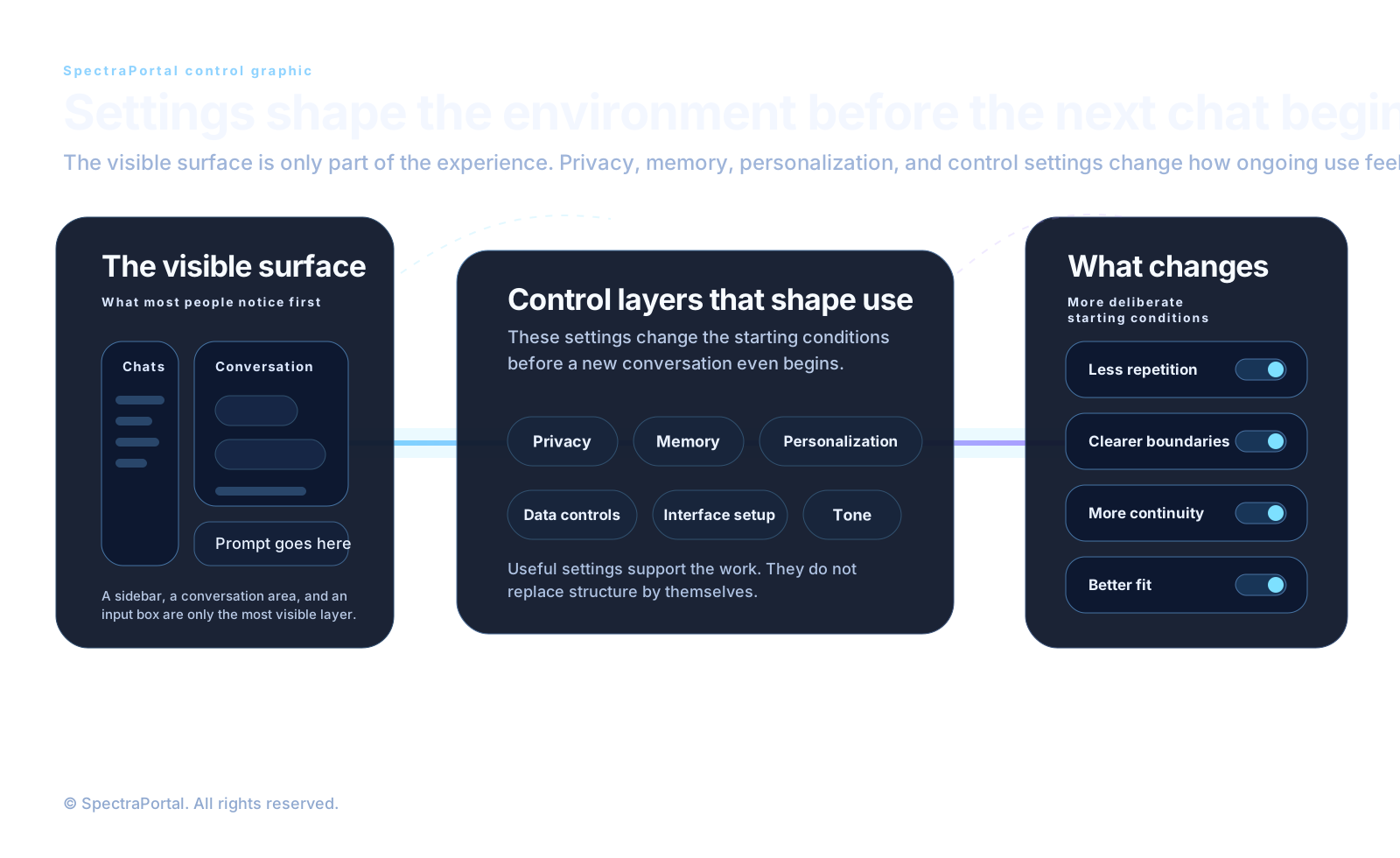
The interface as a working surface
At first glance, the ChatGPT interface can seem simple: a conversation area, a place to type, and some navigation for chats and related surfaces. But once use becomes regular, that surface starts doing more than displaying replies. It becomes the place where someone returns to earlier threads, separates casual questions from deliberate work, and starts building habits around repeated use.
The useful habit is not memorizing every button. Interface details change. What matters more is learning where the main controls tend to live: settings, personalization, memory controls, data controls, and the places where ongoing conversations or projects are organized. In other words, learn the structure of the surface, not just the current placement of icons.
Settings change what the next chat feels like
Most people ignore settings until something feels wrong. Maybe the tone is off, privacy matters more than expected, memory behaves differently than assumed, or each new chat starts too generically. Settings matter because they shape the default starting point before the next exchange even begins.
This is usually the point where more deliberate use begins. Instead of treating settings as background clutter, people start treating them as part of how the tool is configured to support the kind of work they actually want to do.
Privacy is part of the setup
One of the most important controls for many people is the data-setting layer connected to improving the model for everyone. The exact label may move over time, but the practical question stays the same: are you comfortable letting your use contribute to system improvement? Leaving it on may feel fine when the work is casual. Turning it off may make more sense when the work is private, sensitive, client-related, or simply something you want to keep more clearly separated.
Neither choice is automatically right for everyone. The important thing is making the choice consciously. A useful setup begins when you know which tradeoff you are accepting, rather than discovering later that the system was operating under assumptions you never really chose.
Personalization and behavior shaping
Another useful layer lives under personalization. This is where people begin shaping how ChatGPT responds before a specific prompt even appears. Tone, style, preferences, and custom instructions all belong to the broader effort of making the system less generic and more aligned with how someone actually wants to work.
This can be especially useful when the same needs return often. Someone who wants clearer structure, calmer phrasing, more direct answers, less hype, or more concise responses should not have to rebuild those preferences from zero every time. Personalization helps reduce that repetition and gives each new chat a better starting posture.
It still works better as support than as total control. It can shape the feel of ongoing use, but it does not replace project context, source material, or good task framing. It improves the experience without becoming the whole system by itself.
What to check first
For more deliberate use, there are usually three places worth checking early rather than late. Privacy-related controls affect comfort and trust. Memory controls affect what ChatGPT remembers and what you expect it to remember. Personalization shapes tone and repeated behavior. Those are the places most likely to change how the tool feels from day to day.
The point is not to turn on every available feature. The point is to align the setup with the work. Some people want more continuity. Some want less memory and more control. Some want a stronger default tone. Some want as little carryover as possible. A useful setup is one that matches the relationship you actually want with the tool.
What settings cannot do
Better settings help. Personalization helps. Privacy and memory controls matter. But even a well-configured interface does not automatically create durable workflow. These controls can make the experience more comfortable, more aligned, and more intentional, yet they still live around the work more than inside it. That is the same boundary the earlier articles were moving toward from the prompt side.
A better interface can reduce friction, but files, notes, and clear structure are still what keep work from dissolving between chats.
That distinction matters because it keeps expectations in the right place. Settings can improve the experience, but they do not preserve a project by themselves. That deeper layer still depends on structure: instructions, files, notes, sources, and the systems that hold work more explicitly over time. This is also why good prompting and good settings reinforce each other without being the same thing.
Where this points next
Once the surface is understood as setup rather than scenery, the next question becomes more practical: what other choices begin shaping the work before the first answer arrives? That is where model choice, plans, safety habits, projects, files, and the notes the work depends on begin to matter more than interface familiarity alone.
The interface shapes the experience. Files, notes, and clear project structure are what let work last. That is the threshold this article is trying to make clear, and it is the bridge from the guide's first wave into the next set of core-setting choices.